Sixteen pads, one page.
The Sample tab is a drum machine you can play with your thumbs or a MIDI pedal: sixteen pads, a kit library, trim and envelope per pad, and a looper that can print what you play onto a grid.
05.1The grid
Sixteen pads in a fixed 4×4 grid. One page — there are no banks and no second page, so everything you can play is on screen at once.
Turn the phone on its side and the transport becomes a column down the left — the sampler level, the kits key, REC and STOP ALL — while the 4×4 bank takes the whole of the rest of the screen, the pads stretching to fill it.
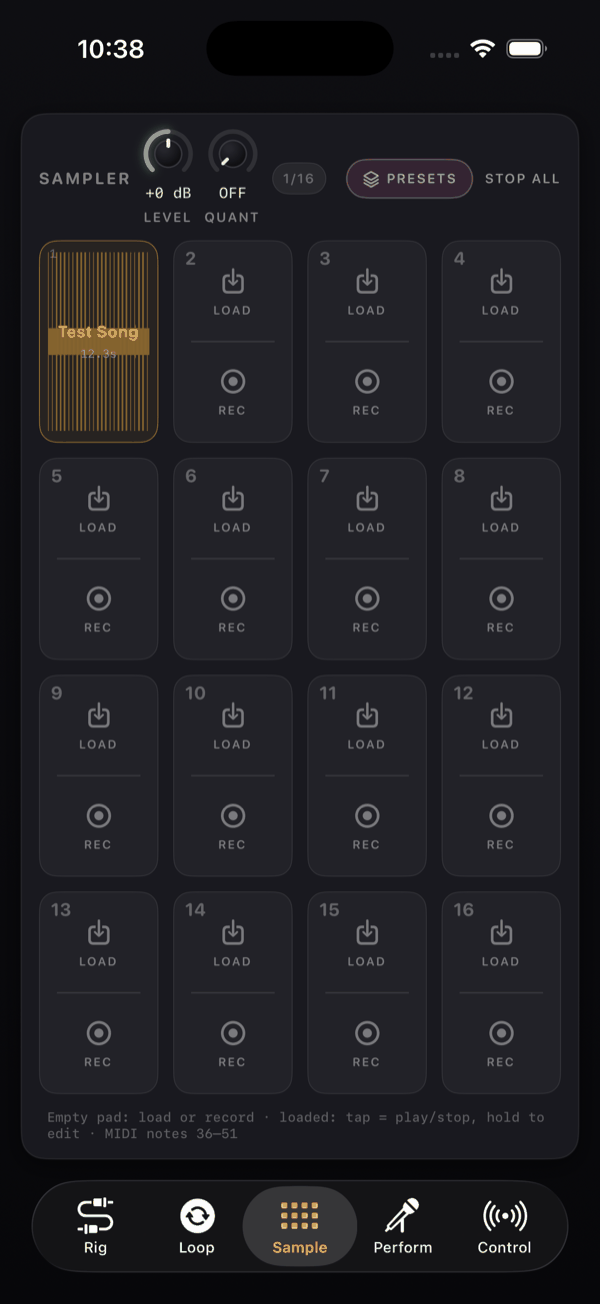
The transport card on top carries, left to right: the word SAMPLER, the sampler's level knob (0 to 2, default 1, read as +0 dB), the kits key, a REC indicator that lights — with the whole card — while a pad is recording, and STOP ALL. The sixteen pads stand under it on their own, close together.
An empty pad splits into two halves — LOAD and REC. A loaded pad shows the sample name, its length (for example 1.4s), its waveform, and a bright cursor sweeping through while it plays. The wave is drawn through the pad's envelope: a slow attack slopes its front, the decay settles it to the sustain level, the release fades the tail — so the pad shows the sound it will actually make, and everything outside the trim is faded back.
A pad lights from its edge inward as it sounds, the deeper the louder, and fades with its sound — however it was fired: a tap, a MIDI note, or a MIDI loop cell replaying its hits.
Long-press any pad for the menu: Load sound…, Record mix or Stop recording, and — on a loaded pad — Edit…, Clear and MIDI Learn: pad N.
05.2Getting sound into a pad
There are three ways to load a file, and they all open the same Files picker: the LOAD half of an empty pad, Load sound… in the long-press menu, and Load file inside the pad editor. Anything iOS can decode is accepted.
Samples are capped at 12 seconds — a longer file is truncated rather than refused. And there is no drag and drop into NAMper: every import goes through the picker.
Recording into a pad
The REC half of an empty pad records straight into it. Only one pad can record at a time, and the take is named Rec N. With the engine stopped it refuses with Audio is off — tap the power button before recording.
It records the main output mix, not the raw input — so the rig, the looper, the other pads and any backing track all land in the sample. That is useful for grabbing a chord straight off your processed tone, and a trap if you meant to capture a dry source. Mute or stop everything else before you hit REC.
05.3The pad editor
Long-press a loaded pad → Edit…. The sheet is headed PAD N with the sample name and its length.
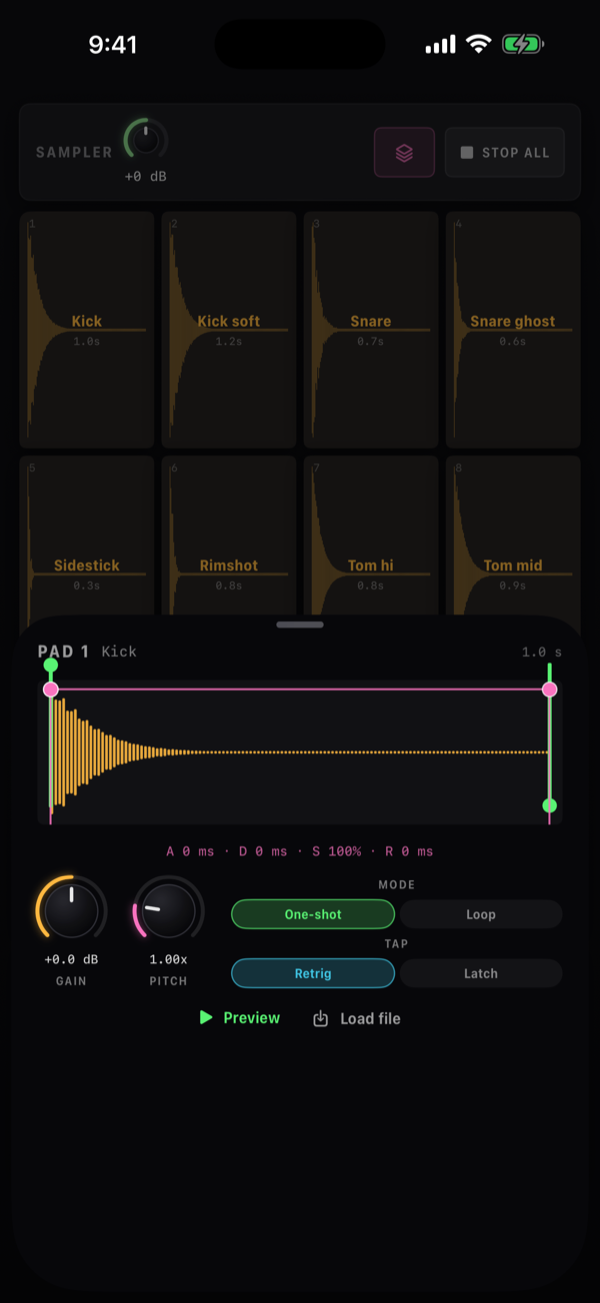
The waveform has draggable trim handles at the start and end — drag the start in to cut off a slow attack, drag the end in to shorten a long tail.
The ADSR envelope shapes the waveform as you edit it — the wave follows the curve — and is edited by dragging three round handles: Attack, Decay and sustain and Release. A readout above shows the values, like A 0 ms · D 120 ms · S 100% · R 0 ms.
Two knobs: Gain (0 to 2) and Pitch (0.25 to 4, shown as 1.00x). Pitch is a resampling rate, so it changes pitch and speed together — a tape-style shift, not a formant-preserving one. Half speed is an octave down.
MODE and TAP
Two pairs of chips decide how a pad behaves under your finger. MODE is One-shot or Loop; TAP is Retrig or Latch. The rule is simple: a pad set to Loop or to Latch toggles start and stop on each tap, and a One-shot / Retrig pad restarts from the trim start every time you hit it — ordinary drum-pad behaviour.
| MODE | TAP | What a tap does |
|---|---|---|
| One-shot | Retrig | Plays once from the trim start, restarting on every tap. Drums, hits, stabs. |
| One-shot | Latch | Plays once; a second tap while it is still sounding stops it. Long one-shots you may need to cut short. |
| Loop | Retrig | Loops until you tap again to stop it. |
| Loop | Latch | Loops until you tap again to stop it. Beds, drones, rain, vinyl crackle. |
At the bottom, Preview auditions the pad with your current settings and Load file swaps the sound without leaving the editor.
No choke groups (an open hat will not be cut by a closed one), no per-pad pan, no reverse, no velocity layers, no per-pad output routing and no momentary gate-while-held mode. Pads play at their set Gain and stop when the sample or the envelope says so.
05.4Kits
A kit is a snapshot of all sixteen pads — every trim, envelope, gain, pitch and mode setting — plus a private copy of every pad's audio. That copy is the point: once a kit is saved, importing over a pad, clearing it or deleting the original file cannot hollow the kit out. Load it back in six months and it still plays.
Open the browser with the kits key in the transport; the sheet is titled Sampler Kits. Tap a row to load it. The row menu has Rename, Update with current kit and Delete. Deleting a kit never removes audio that the loaded pads or another saved kit are still using.
The footer of the sheet says why: Kits live on this device (they carry their audio files). There is no share or export for a kit, and the full backup export leaves sampler kit audio out — it carries parameters and references only. Copy the samples/ folder in the Files app if you need the sounds on another device.
The four factory kits
| Kit | The sixteen pads |
|---|---|
| Drums — Digital | Kick 808, Kick punch, Snare, Clap, Rim, Hat cl, Hat op, Ride, Tom lo, Tom mid, Tom hi, Cowbell, Clave, Shaker, Zap, Sub boom |
| Drums — Analog | Kick round, Kick tight, Snare fat, Clap warm, Rim wood, Hat cl, Hat op, Crash, Tom lo, Tom mid, Tom hi, Conga, Bongo, Shaker, Perc snap, Sub warm |
| Drums — Acoustic | Kick, Kick soft, Snare, Snare ghost, Sidestick, Rimshot, Tom hi, Tom mid, Tom floor, Hat closed, Hat pedal, Hat open, Crash, Ride, Ride bell, Tambourine |
| FX & Textures | Riser, Downlifter, Impact, Laser, Sweep, Vinyl stop, Cym rev, Sub drop, Stab, Bleep, Alarm, Crackle (looping), Wind (looping), Chime, Robot, Rumble |
A deleted factory kit stays deleted — it does not come back on the next launch. Rename or update one rather than deleting it if you only want it out of the way.
05.5Timing and quantize
Pads always sound the moment you hit them. A pad that waited for the next sixteenth before it spoke would feel broken under your fingers, so the sampler itself never moves a hit.
Timing is fixed where the playing is kept: record the pads into a looper cell whose IN is Sampler pads (MIDI). That cell stores each hit as an event and has its own Quantize knob and GRID (1/4 to 1/32) — while you record, or afterwards in its editor, where quantizing never destroys the take as you played it. See MIDI cells.
05.6Playing the pads
By touch: a tap plays or stops the pad according to its MODE and TAP settings, and a long-press opens the menu.
By MIDI: notes 36 to 51 play pads 1 to 16, following the GM drum convention — note 36 is pad 1. They come as factory mappings in Settings → Control, on any MIDI channel, so they respect Loop and Latch like a tap does — one press starts a looping pad, the next stops it — and you can move, delete or restore them like any other mapping.
Velocity is not used. However hard you hit a controller pad, the sample plays at the Gain you set in the editor. Set the levels once in the pad editor and they stay put.
05.7Where the pads go
Pads sum straight into the main mix — they do not run through the guitar chain, so your amp's gain and your reverb never touch them. The level knob in the transport sets how loud the whole sampler sits against the rig.
They are also available elsewhere in the app as a source:
- As a chain input — pick Sampler pads on a rig's IN connector or on a parallel branch (chip SMPL) and the pads run through that rig's effects.
- As a loop cell source — set a looper cell's IN to Sampler pads (MIDI) and it records the beat you tap out as hits you can edit and quantize: a MIDI cell.
- As a compressor sidechain — a Compressor block's Sidechain menu includes SMP, so the kick can duck the guitar.
STOP ALL in the transport releases every playing pad at once — the panic button for a latched drone or a loop you cannot find.