
One desk, everything that sounds.
The Mix tab is a console: a channel strip for every rig and every branch, one for each loop track, one for the sampler and one for the backing player, two global effect buses and a master section — all on one grid, slot for slot, so a fader is always in the same place.
07.1The desk
Everything the app can make a sound with stands in a strip of its own, and every strip is built from the same slots in the same order. Nothing is hidden in a submenu: the whole signal flow of the app is one screen wide.
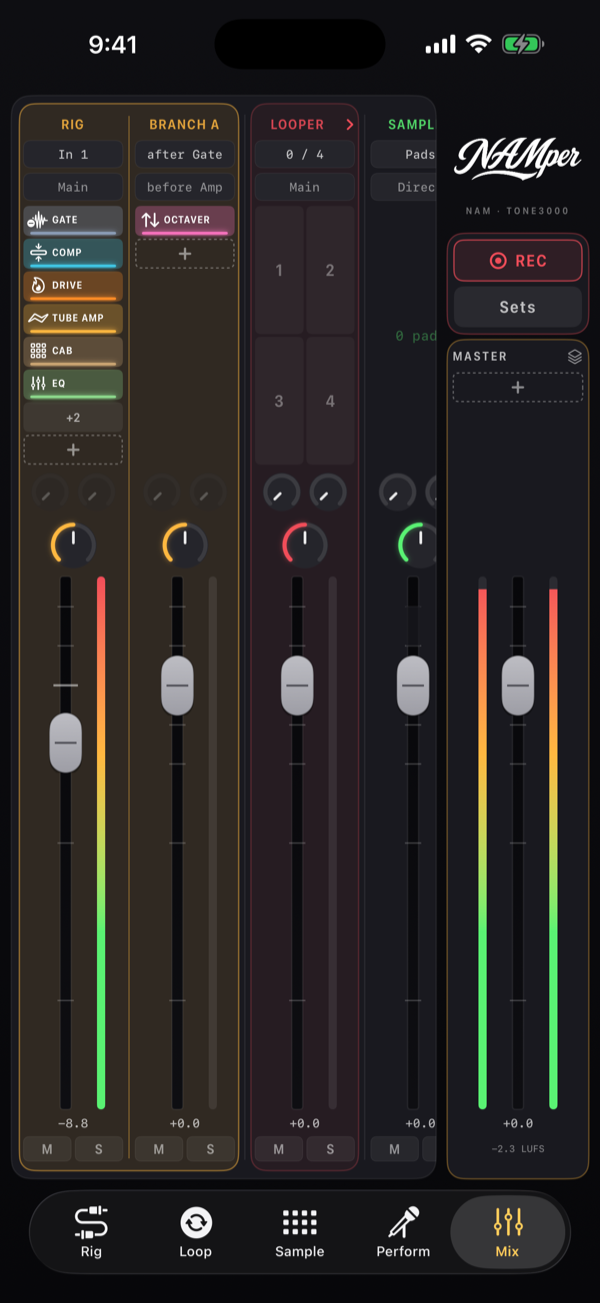
From left to right the desk holds:
- one strip per rig, with that rig's branches beside it in the same tinted group;
- Loop 1–Loop 4, folded into one Looper strip until you open them;
- Sampler — the pad bus — and Backing — the player on the Perform tab;
- Send A and Send B, the two global effect buses;
- the right-hand column, which never scrolls: the recorder and the MASTER.
The desk is live, not a snapshot: a rig you add on the Rig tab turns up here, a loop track you record fills in, and the meters run whether or not you are looking at them.
07.2A channel strip
Top to bottom, every strip carries the same controls:
| Slot | What it does |
|---|---|
| Name | What the strip is. On a rig, tapping it gives that rig MIDI focus. |
| IN / OUT | Where the strip takes its signal from and where it leaves — see below, they read differently per strip. |
| Blocks | The chain as small chips with their LEDs. Tap one to open its sheet, hold it for bypass or remove, and the dashed + adds a block at the end. |
| Sends | Two small dials, one per send bus. |
| Pan | A dial; a double tap brings it back to centre. |
| Fader | −60 … +12 dB, ticks at 0 / −6 / −12 / −24 / −48, a double tap returns it to 0 dB. |
| Meter | A post-fader peak meter beside the fader, so what you see is what leaves the strip. |
| M / S | Mute and solo. Solo silences everything but the master. |
Mutes and solos are a performance state. They never go into a preset, and they are still there after a relaunch — the desk comes back the way you left it.
07.3Rigs and branches
A rig's strip is its signal chain seen from the side. The IN chip names the interface channel it listens to — or the sampler bus, or a loop track — and the OUT chip names where it goes: the main mix or an output pair of its own.
A branch gets a strip beside its rig, in the same tint. Its chips read as the junctions do on the Rig tab: IN says after which block the branch forks, OUT says before which block it merges back. Its fader is the branch level, and its M mutes the branch without taking it out of the graph — for that, use the branch's power switch on the Rig tab or the Bypass branch button in the strip's sheet.
The block chips edit the real chain: what you change here is changed on the Rig tab, and the audio never drops while you do it.
07.4Loops, sampler, backing
- Looper — one folded strip showing how many tracks are running; open it and each of the four gets a strip with its own IN and OUT (the same choices as on the Loop tab), its state, sends, pan and fader. Whole looper keeps them under one fader instead.
- Sampler — the whole pad bus in one strip, with a pan of its own here rather than on the Sample tab.
- Backing — the player. Its OUT chip carries the routing the Perform tab calls DIRECT and PRE FX: Direct keeps the track out of the master chain, Master FX runs it through. Live you almost always want Direct.
07.5Send A and Send B
Two global buses, so one reverb can sit behind the whole band instead of one per rig.
Each bus has a strip of its own, and that strip holds the return chain: up to four blocks — delay, reverb, modulation, dynamics or utility — with the return level and pan into the master, ahead of the master FX.
Every other strip carries two send dials. On the players they are live at once. On a rig or a branch a dial goes live when that chain holds a Send block for the bus (added from the chain's + menu, under Utility) — the send is taken from wherever in the chain you put that block, so a delay can be fed from before the amp or after it, your choice.
The return chains are saved with master presets, not with rig presets: they belong to the desk, not to one instrument.
07.6The master section
The MASTER strip on the right is the last stage before the output: every rig, every loop track and both send returns run through it. It used to live on the Rig tab; it is here now, beside the faders it belongs with.
It carries up to six blocks of its own — the ones that belong on a mix rather than on one instrument:
| Family | Blocks |
|---|---|
| Dynamics | Comp, De-Esser, Limiter, FB Guard |
| Delay | Delay |
| Reverb | Reverb |
| Utility | EQ, Volume, Saturator |
Hosted plugins go inside a rig chain only: the master ADD menu does not offer them. For a limiter across everything, use the built-in Limiter block.
- The dashed + bar adds a block. A family that has saved block presets opens a submenu: default settings, one of your saved presets, or a block lifted straight out of a rig preset.
- The bars run top to bottom in the order the audio does. Tap one to edit it; long-press for bypass, Move and remove.
- The stack icon in the strip's header opens Master Presets — the whole master chain saved and recalled, the same library the rigs have. The send returns are saved with them.
- The master fader (−60 … +12 dB) is the last thing before the output, with stereo peak bars and a LUFS readout beside it.
What does not pass through the master: the click, and the sampler pads (unless a loop track or a recording lane is set to take the sampler bus). The backing player goes direct too, until you switch its OUT to Master FX.
07.7The recorder
The right-hand column also holds the recorder, so it is in reach while you are setting levels: REC with its running time, and Sets — the takes it has captured. From there a take can be previewed, renamed, shared as a single stem or as a whole DAW project, and deleted. What each lane records, and what the export contains, is on the Perform page.
07.8On a phone
A tablet fits a whole show across the desk. On a phone the strips scroll sideways while the master column stays put.
Turn the phone on its side and the desk splits into two pages, chosen with the wide tabs above it:
- Faders — M / S, the send dials, pan and the fader with its meter;
- Blocks — the same strips showing their chains, each block a full-width bar you can hit with a thumb.
The master card and the recorder stay beside both pages, and the tab bar shrinks to a compact pill at the foot of the screen so the desk gets the height.